本页就如何将地图保存为bmp,以及任取bmp上某点的像素值,反向计算坐标做介绍说明。 |
运行环境准备
软件平台
- Visual Studio 2010 SP1
- Slamware Windows SDK:Slamware Windows SDK
- RoboStudio(用于显示地图):Robostudio installer
Sample Code:
使用更高版本的Visual Studio可能会带来编译异常。
使用Visual Studio 2010(无SP1)可能会因为无法与.Net Framework兼容而报编译错误,此时增加SP1更新包即可解决问题
硬件平台
(以下任选其一)
- Slamware SDP mini
- Slamware 套装 (基于Slamware导航方案的用户机器人系统)
- Apollo/Ares/Athena等底盘系统
编译运行
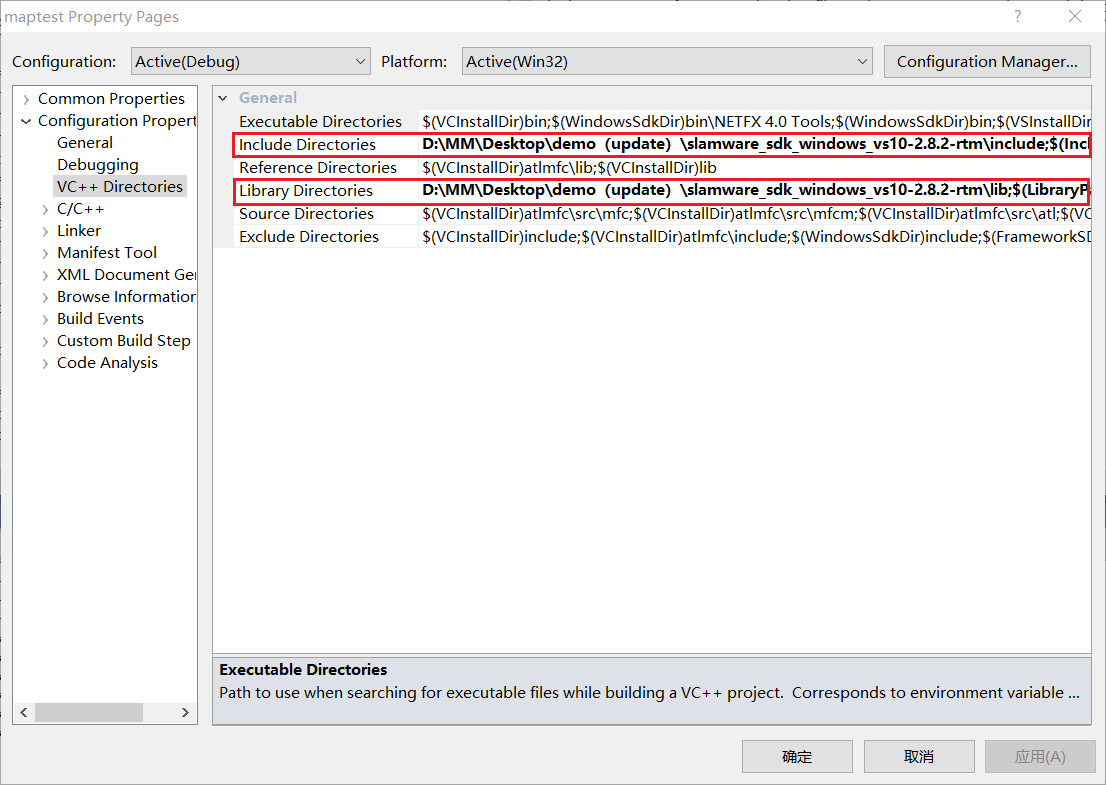
1.打开maptest工程,右键maptest, 打开属性选项,将Slamware SDK 的include目录和lib目录添加到工程
2.点击Debugging,设置command Arguments如下图。
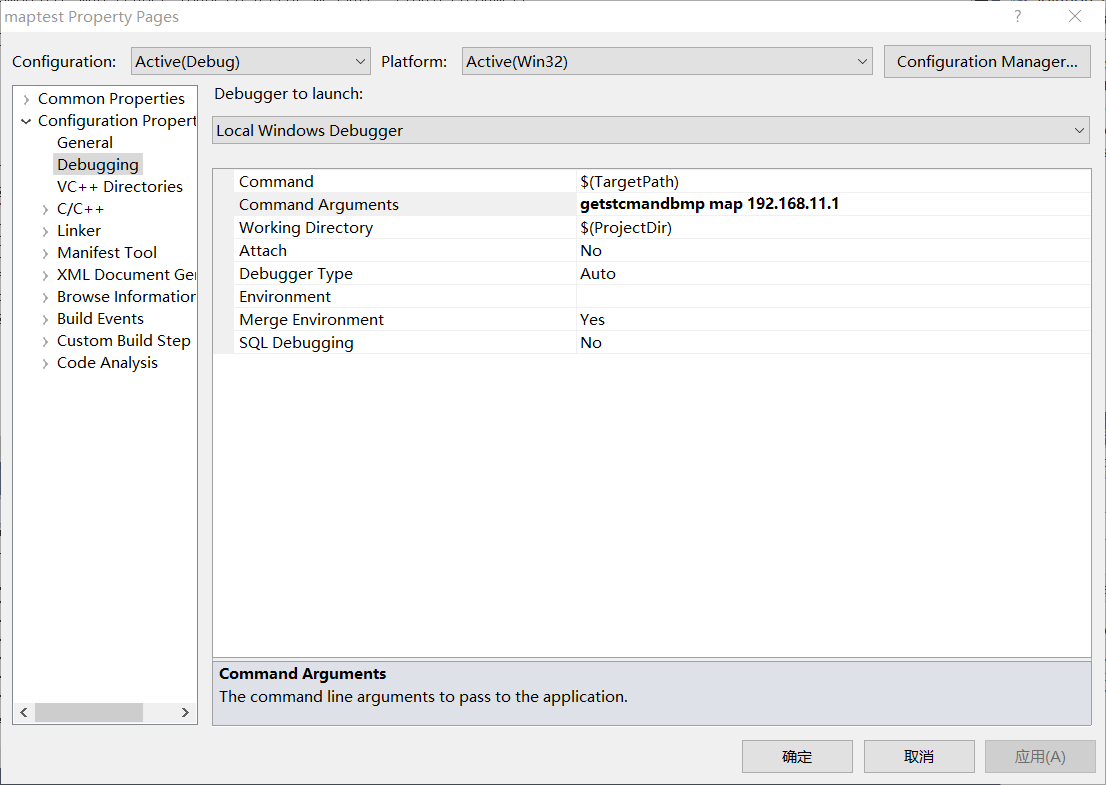
composite_map_demo [OPTS] [filename] <SDP IP Address>
SDP IP Address The ip address string of the SLAMWARE SDP
getstcmandbmp filename download compositeMap and bmp map
setstcm filename upload compositeMap
-h Show this message
3.点击F5运行
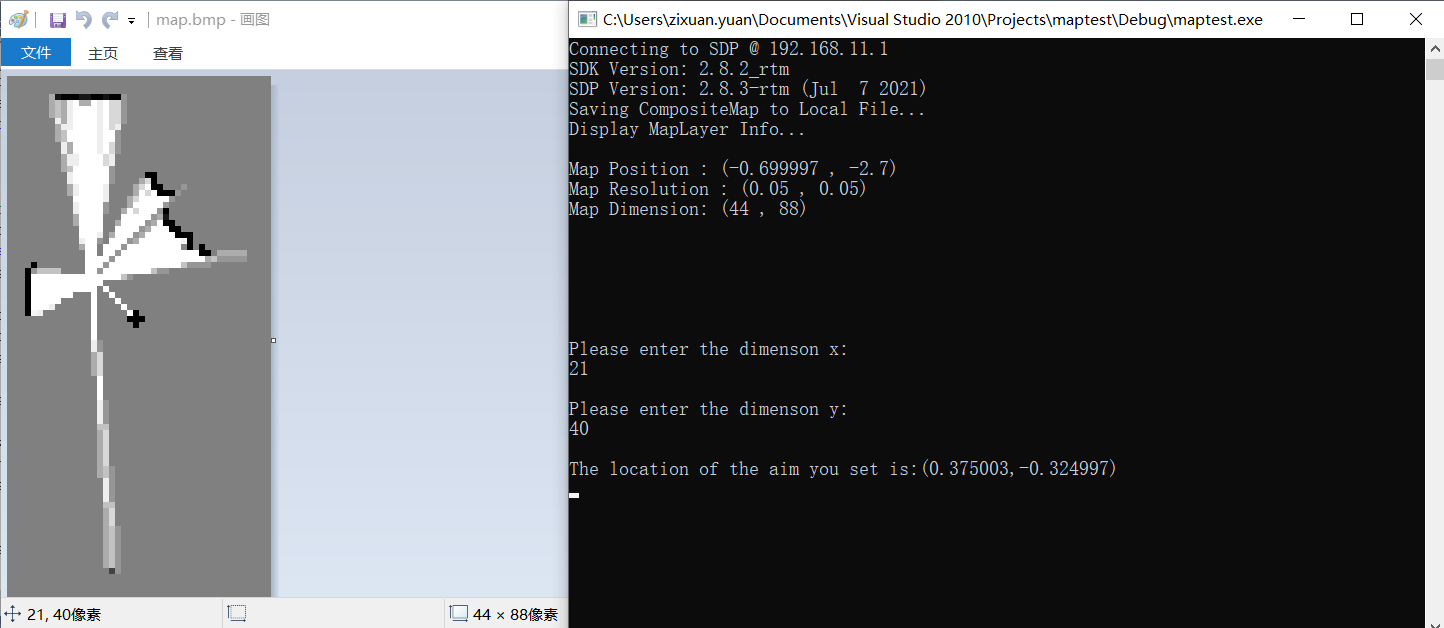
4.工程下会生成map.stcm和map.bmp。将bmp文件用”画图“工具打开。选择任意一点,界面左下角显示当前的像素值。在console中输入,计算出该像素值的坐标1。
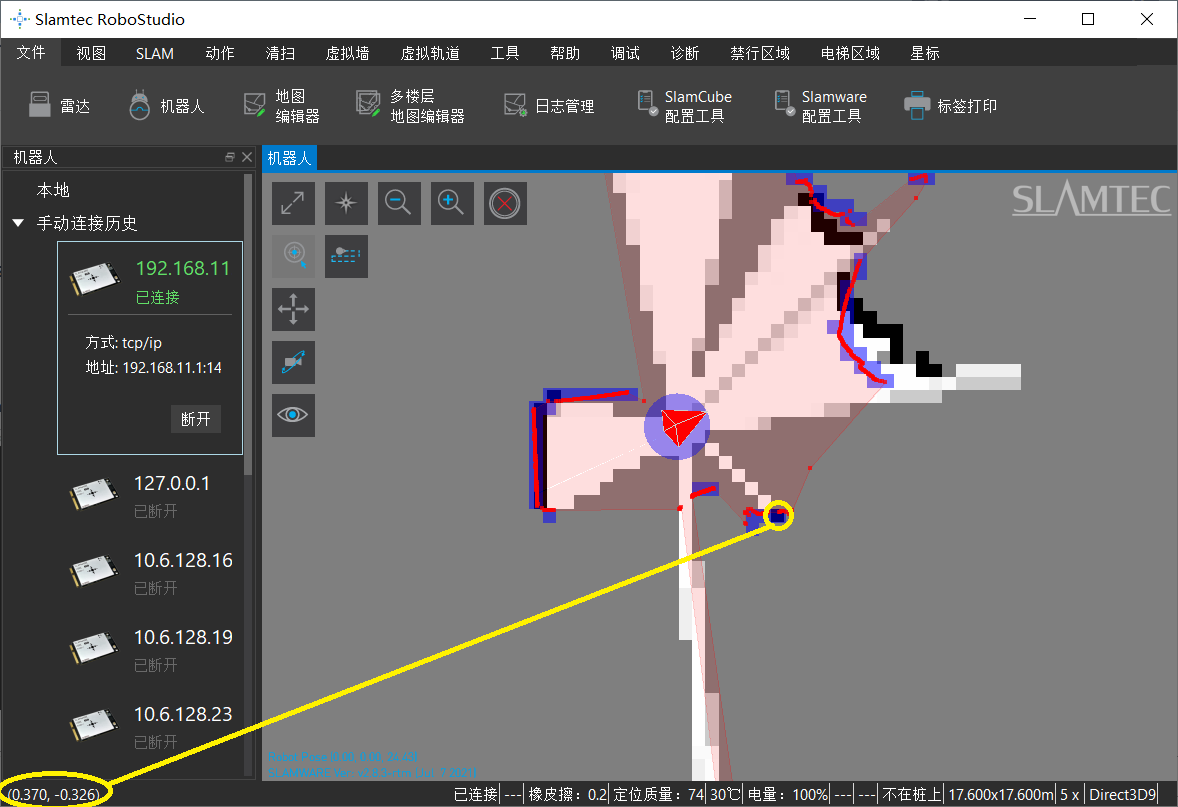
5.打开RoboStudio,找到刚刚bmp中任取的点。鼠标放到点上,观察左下脚的坐标2。对比坐标2与坐标1是否相同。(由于该步骤取点和放置鼠标过程会存在轻微的偏差,两个坐标大致基本相同即可。)
6.composite_map_demo setstcm map 192.168.11.1 (如果想再次验证,可以将刚刚生成的stcm地图重新加载给机器,重复上面取点并对比坐标的过程。)
代码描述
从机器人获取compositemap,并将其保存为stcm地图
bool StcmMapWriter(const std::string file_name, SlamwareCorePlatform platform) {
	std::string finalFilename = file_name;
	finalFilename += ".stcm";
	CompositeMap composite_map = platform.getCompositeMap();
	CompositeMapWriter composite_map_writer;
	std::string error_message;
	bool result = composite_map_writer.saveFile(error_message, finalFilename, composite_map);
	return result;
}
将stcm地图上传给机器人
bool StcmMapReader(const std::string file_path, rpos::core::Pose pose, SlamwareCorePlatform platform) {
	std::string finalFilename = file_path;
	finalFilename += ".stcm";
	CompositeMapReader composite_map_reader;
	std::string error_message;
	boost::shared_ptr<CompositeMap> composite_map(composite_map_reader.loadFile(error_message, finalFilename));
	if (composite_map) {
		platform.setCompositeMap((*composite_map), pose);
		return true;
	}
	return false;
}
获取机器人的地图,并将其保存为bmp格式
bool SaveToBmp(const char * filename, SlamwareCorePlatform platform)
{
	std::string finalFilename = filename;
	finalFilename += ".bmp";

	rpos::core::RectangleF knownArea = platform.getKnownArea(MapTypeBitmap8Bit, rpos::features::location_provider::EXPLORERMAP);
	Map map = platform.getMap(MapTypeBitmap8Bit, knownArea, rpos::features::location_provider::EXPLORERMAP);

	bitmap_image mapBitmap(map.getMapDimension().x(), map.getMapDimension().y());

	for (size_t posY = 0; posY < map.getMapDimension().y(); ++posY)
	{
		for (size_t posX = 0; posX < map.getMapDimension().x(); ++posX)
		{
			rpos::system::types::_u8 cellValue = ((rpos::system::types::_u8)128U) + map.getMapData()[posX + (map.getMapDimension().y()-posY-1) * map.getMapDimension().x()];
			mapBitmap.set_pixel(posX, posY, cellValue, cellValue, cellValue);
		}
	}
	mapBitmap.save_image(finalFilename);
	return true;
}
输入在bmp上任意一点的像素,计算该像素对应地图中的坐标
void convertdemension(rpos::core::Location mapposition,double height)
{
	std::cout << "Please enter the dimenson x:" << std::endl;
	int dx;
	std::cin >> dx ;
	std::cout <<  std::endl;
	std::cout << "Please enter the dimenson y:" << std::endl;
	int dy;
	std::cin >> dy;
	std::cout <<  std::endl;

	rpos::core::Location loc;
	loc.x()=mapposition.x()+(dx+0.5)*map_resolution;
	loc.y()=mapposition.y()+(height-dy-0.5)*map_resolution;

	std::cout << "The location of the aim you set is:("<<loc.x()<<","<<loc.y()<<")"<< std::endl;
}